
19.5: Review Terms, Privacy, And Account Data
Legal notices and account deletion affect access to your work, so treat them as deliberate account decisions rather than routine settings. In this section, you will open the current legal pages, understand updated-Terms states, download available presentation source data, and review permanent deletion safely.
1. Open The Current Legal Pages
Use the public-site footer to open the Terms of Service and Privacy Policy. The version and effective date appear near the top of each page.
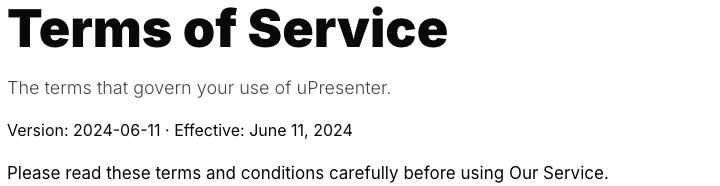
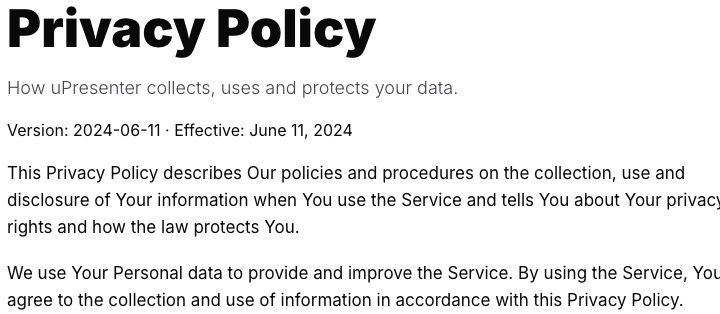
Always review the live pages. The screenshots show the verified documentation snapshot, not a permanent promise that a particular version remains current. This section explains product controls and is not legal advice.
2. Respond To Updated Terms
When uPresenter requests review, use the banner's Review now action. The dialog links to the version being requested and offers these choices:
- Accept and continue becomes available after you select I have read and agree to the Terms of Service.
- Review later keeps the current access during a pre-effective or paid grace period.
- Continue limited closes the dialog after the new Terms are already effective, but restricted actions can request acceptance again.
- I don't agree opens a second confirmation. Declining does not immediately sign you out or delete your data.
Access depends on timing and billing state:
| State | What to expect |
|---|---|
| Full access before the effective date | Work continues until the displayed date; the review notice can return. |
| Paid grace period | Full access continues through the displayed paid period. If the current user controls renewal, declining can stop renewal; a team member's billing administrator controls the team's renewal. |
| Limited access | Creating, editing, publishing, and sharing can be restricted. Presenting or downloading normal formats asks for Terms review again. |
You can accept later from the persistent banner. Optional marketing email consent remains separate from the required Terms choice.
3. Download Available Presentation Source Data
In limited updated-Terms access, an owner can still open an owned presentation's Download menu and use Your data > Presentation source (.zip). This exception is available for native presentations, not templates, and can include presentation JSON, optional theme JSON, and available original resources.
This is a presentation-by-presentation source export, not a complete account archive. Section 15.3 explains the exact workflow and restrictions.
4. Delete Your Account
Open Settings > Profile and find Danger Zone. The same area is available under the non-subscription account tabs.
- Resolve any work, memberships, billing, or ownership that another person still needs. Cancel an active subscription first when practical and keep required invoices.
- Select Delete my account. uPresenter checks whether the account can enter self-service deletion.
- Review the irreversible deletion message.
- Select I understand and want to proceed only when you are certain.
- Select Delete Account.
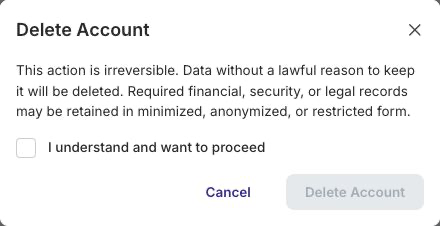
The current service permits a valid account to reach deletion even when it owns a licensed team; ownership alone is no longer a documented blocker. Deletion removes data without a continuing purpose and deletes or removes relationships for owned presentations, teams, classes, memberships, invitations, and related content. Records that may require a financial, security, legal-claims, or accountability purpose can be retained only in minimized, anonymized, pseudonymized, or access-restricted form.
uPresenter also attempts to cancel an active FastSpring subscription and remove data from connected processors used by the deletion service. If a required step fails, deletion can fail instead of silently leaving a partially completed account. After success, uPresenter signs the browser out and clears account-scoped browser data such as remembered invoice details, generated-content drafts, editor connection credentials, and editor clipboard data. Device-wide preferences can remain.
Account deletion is irreversible. It is different from deleting a presentation, leaving a team, or unsubscribing from marketing email.
Troubleshooting
| What happens | What to do |
|---|---|
| Delete Account is disabled | Select I understand and want to proceed after reading the confirmation. |
| The account cannot enter or finish deletion | Resolve active billing or external-service issues and retry. Contact support without sending passwords or payment-card data. |
| A normal export opens Terms review | Accept the current Terms, or use the limited owner-only presentation source option when it is available and appropriate. |
| The Terms banner returns | The current version is still pending or declined. Select Review now and finish the decision for that version. |
| You need a full account data request | The presentation-source ZIP is not a complete account archive. Use the contact/support process described by the live Privacy Policy. |
Previous: Review Storage · Next: Part XX — Help, Troubleshooting, And FAQ · Back to Part XIX · Back to the full guide