
3.5: Use Inspiration And Remix Public Content
Inspiration is a gallery of presentations that creators have made public. It is useful both for discovering ideas and for creating an editable copy when the publisher allows reuse. In the current interface, that reuse action is labeled Use this presentation.
Before You Begin
Sign in, switch to Teacher View, and confirm the active workspace. A reused presentation becomes a separate copy owned in that workspace, so choose the destination before you begin.
1. Browse Inspiration
Select Inspiration in the dashboard sidebar.
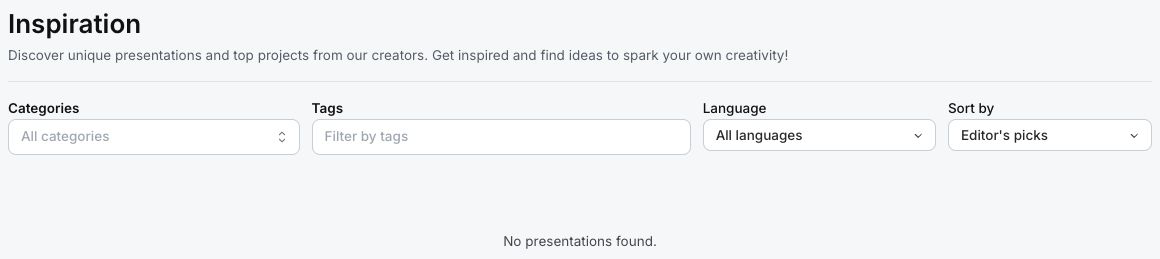
Use the controls above the gallery to narrow the public work:
| Control | How to use it |
|---|---|
| Categories | Choose one or more areas such as Education, Training, Business, or Technology. |
| Tags | Enter specific topic words assigned by publishers. |
| Language | Keep All languages or choose the language you need. |
| Sort by | Choose Editor's picks, Most viewed, or Recent. |
A presentation card can show its title, author, view count, language, category, and tags. Select a card to open its preview.
If No presentations found. appears, clear some filters. If it remains after all filters are clear, no published Inspiration fixture is available in the current catalog or workspace environment.
2. Preview Before Reusing
The preview opens the public presentation inside a dialog. Move through enough pages to check:
- whether the learning goal and audience resemble yours;
- whether questions, examples, and terminology are accurate for your context;
- whether the structure is suitable for adaptation; and
- how much visual or accessibility work the copy will require.
Select View in new tab when you need a larger playback view. Return to the preview dialog when you are ready to reuse it.
3. Use The Presentation In Your Workspace
When the publisher permits reuse, select Use this presentation. uPresenter duplicates the public presentation and opens the copy in the editor.
If the button is not present, the publisher has made the work viewable but not reusable. Do not work around that setting by copying protected content manually.
After the copy opens:
- Rename it so it is distinguishable from the public source.
- Replace organization-specific language, examples, branding, and contact details.
- Verify every fact, question answer, score, feedback message, link, and media asset.
- Review presentation settings, completion and success criteria, sharing, and learner attempt behavior.
- Use Present to test the result before assigning, publishing, or exporting it.
Remixing is a starting-point workflow, not an endorsement of the source. You remain responsible for the accuracy, rights, accessibility, and learner fit of your copy.
Editor's Pick Ratings
Administrators and marketing users can see star controls for an editor's-pick rating. Standard authors do not need those controls. The Editor's picks sort remains useful because it surfaces items curated through that internal process.
Quick Check
Before you finish, make sure that you can:
- filter and sort the Inspiration gallery;
- preview a public presentation before copying it;
- recognize when Use this presentation is unavailable; and
- review a reused copy as carefully as content you created yourself.
Previous: Start From A Template · Next: Use uPresenter From Claude Or Codex · Back to Part III · Back to the full guide